
Every app you build gets a JavaScript object called AndroidAPI. It lets your HTML page use native Android features: notifications, camera, GPS, sensors, files, sharing, vibration, ads and more. This page explains how the bridge works. The method index links to a detailed reference with examples for every method.
Check that the bridge exists
AndroidAPI exists only inside the generated app. Check for it so the same page still works in a desktop browser:
const native = typeof AndroidAPI !== 'undefined';

function toast(text) {
  if (native) AndroidAPI.showToast(text);
  else alert(text);
}
Test native features in an installed APK. The builder’s preview is for layout and web behaviour; native results there can differ from the real app.
How calls and events work
There are two kinds of methods.
Synchronous methods return a value immediately:
const battery = AndroidAPI.getBatteryLevel();         // number
const info = JSON.parse(AndroidAPI.getDeviceInfo());  // object-like results are JSON strings
Asynchronous methods start an operation and return nothing. The result arrives later as an event. They are not Promises, so await AndroidAPI.capturePhoto(...) does not wait for the photo.
Every event is delivered in two ways. Pick one style and use it consistently:
// 1. A normal DOM event; the data is in event.detail
window.addEventListener('cameraResult', e => {
  console.log(e.detail.success, e.detail.error);
});

// 2. One global dispatcher for all events
window.onAndroidEvent = function (name, data) {
  if (name === 'cameraResult') console.log(data.success, data.error);
};
Register the listener before you call the method.
Callback IDs
Many asynchronous methods take a callbackId string. The same value comes back in the event, so you can tell which request a result belongs to:
window.addEventListener('locationResult', e => {
  if (e.detail.callbackId === 'checkin') saveCheckin(e.detail);
  if (e.detail.callbackId === 'weather') loadWeather(e.detail);
});
AndroidAPI.getLocation('checkin');
Use a new ID for each operation and ignore results that arrive for an operation the user already left.
Success, errors and wrapping in a Promise
Most results contain success and error. Always check them: users cancel dialogs, deny permissions and turn off GPS. Error codes are listed on each reference page. Treat unknown error text as a failure too.
If you prefer async/await, wrap a call yourself:
function nativeCall(eventName, start, timeoutMs = 30000) {
  return new Promise((resolve, reject) => {
    const id = eventName + '-' + Date.now() + '-' + Math.random().toString(36).slice(2);
    const timer = setTimeout(() => { cleanup(); reject(new Error('timeout')); }, timeoutMs);
    function onEvent(e) {
      if (e.detail.callbackId !== id) return;
      cleanup();
      e.detail.success ? resolve(e.detail) : reject(new Error(e.detail.error || 'failed'));
    }
    function cleanup() { clearTimeout(timer); window.removeEventListener(eventName, onEvent); }
    window.addEventListener(eventName, onEvent);
    start(id);
  });
}

// Usage
const photo = await nativeCall('cameraResult', id => AndroidAPI.capturePhoto(id), 120000);
img.src = photo.base64;
A JavaScript timeout does not cancel the native operation. Ignore late results safely.
Permissions in two steps
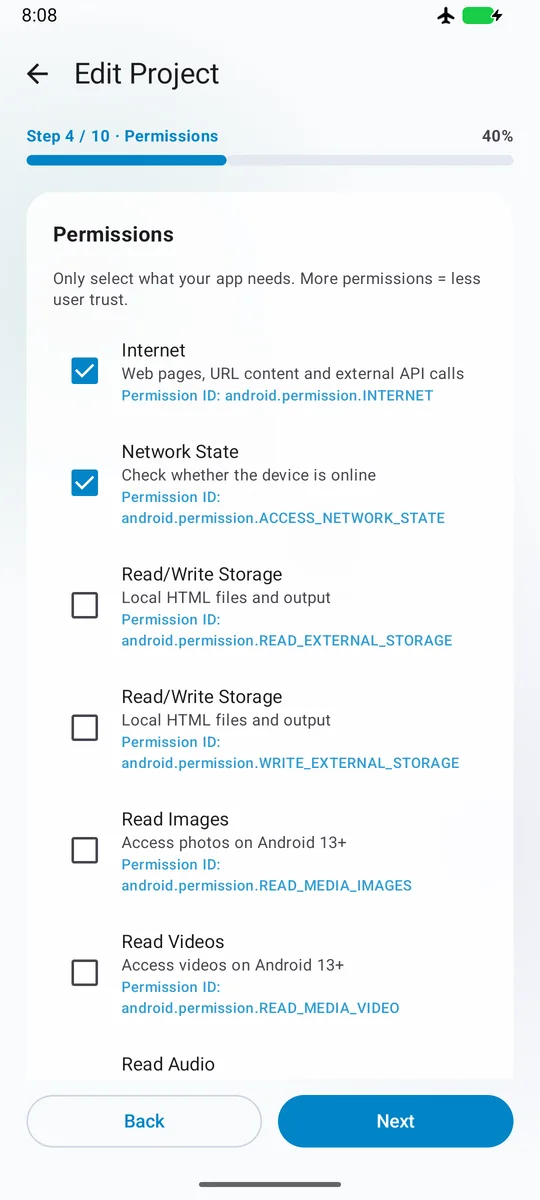
- Declare the permission before building, in Advanced Build → Permissions. The permission step scans your code, marks the permissions it needs and can add them with one tap. Quick Build includes Internet, network state and vibration.
- Request it at runtime when the user starts the feature, for camera, microphone, location, notifications (Android 13+) and the step counter.
A runtime request cannot add a permission that was not declared. Full details: permissions reference.
Pro and AI-created apps
Some methods are Pro-gated: location, address lookup, sensors, native camera preview, audio recording, scheduled notifications, the system file picker, “save as” and saving to the gallery. They are marked Pro in the index below.
For projects you create manually, these methods work when the app is built with Pro. Without Pro they send a proRequired event, and many also return their normal result with error: "pro_required". Projects created with the AI builder include native API access for that app; this does not unlock other Pro features such as AAB export. Check JSON.parse(AndroidAPI.getAppInfo()).isPro to hide Pro features in a build that does not include them.
Security
- By default,
AndroidAPIworks only on your app’s own pages: the local files, or your own website and its subdomains in a URL project. Other sites, ads and embedded third-party frames cannot call it. Keep this default. - Everything in your HTML can be read by anyone who has the APK. Never put passwords, private API keys or service credentials in it.
Method index
| Method | What it does | Pro | Reference |
|---|---|---|---|
showToast |
Short native message | device | |
getDeviceInfo |
Model, manufacturer, Android version | device | |
getAppInfo |
Package, version, app name, Pro flag | device | |
getBatteryLevel |
Battery percentage | device | |
isOnline, getNetworkType |
Connection state and type | device | |
vibrate, cancelVibrate |
One vibration / stop | device | |
vibratePattern |
Vibration pattern | device | |
getScreenBrightness |
System brightness | device | |
setScreenBrightness |
Brightness of your app’s window | device | |
keepScreenOn |
Keep the screen awake | device | |
setTorch |
Flashlight on/off | device | |
getLaunchDeepLink, onDeepLink |
Link that opened the app | device | |
hasPermission |
Is a permission granted? | permissions | |
requestPermission |
Ask for one permission | permissions | |
requestPermissions |
Ask for several permissions | permissions | |
requestNotificationPermission |
Ask for notifications | permissions | |
shouldShowRequestPermissionRationale |
Should you explain first? | permissions | |
openAppSettings |
App settings screen | permissions | |
openNotificationSettings |
Notification settings | permissions | |
openExactAlarmSettings |
Exact alarm settings | permissions | |
showNotification |
Notification now | notifications | |
cancelNotification, cancelAllNotifications |
Remove notifications | notifications | |
scheduleNotification |
Reminder later or repeating | Pro | notifications |
cancelScheduledNotification |
Cancel a reminder | Pro | notifications |
canScheduleExactAlarms |
Are exact alarms allowed? | notifications | |
getLocation |
Current position | Pro | location |
startLocationUpdates, stopLocationUpdates |
Track movement | Pro | location |
getAddress |
Coordinates to address | Pro | location |
startSensor |
Accelerometer, gyroscope, light, steps… | Pro | sensors |
stopSensor, stopAllSensors |
Stop sensors | Pro | sensors |
capturePhoto |
Take a photo (rear or front) | camera | |
startCameraPreview, stopCameraPreview |
Native live preview | Pro | camera |
compressImage |
Resize and compress | camera | |
saveToGallery |
Save an image to the gallery | Pro | camera |
startAudioRecording |
Start recording | Pro | audio |
stopAudioRecording |
Stop and get the file | Pro | audio |
getAudioFileBase64 |
Read a recording for playback | audio | |
readAppFile |
Read a private text file | files | |
writeAppFile |
Write a private text file | files | |
deleteAppFile |
Delete a private file | files | |
listAppFiles |
List private files | files | |
pickFile |
Open a file from the phone | Pro | files |
writeFile |
“Save as” to a chosen place | Pro | files |
copyToClipboard, pasteFromClipboard |
Clipboard | files | |
shareText |
Share text or a link | sharing | |
shareFile |
Share a saved file | sharing | |
shareFileFromBase64 |
Share generated data | sharing | |
printPage |
Print or save as PDF | files | |
downloadDataUri, downloadBlobUrl |
Save to Downloads | files | |
httpGet |
GET request without CORS | network | |
adsInitialize |
Start AdMob | ads | |
adsCanRequestAds, adsGetConsentStatus |
Consent state | ads | |
adsIsPrivacyOptionsRequired, adsShowPrivacyOptionsForm |
Privacy choices | ads | |
adsLoadBanner, adsShowBanner, adsHideBanner, isBannerAdLoaded |
Banner ads | ads | |
adsLoadInterstitial, adsShowInterstitial, isInterstitialAdLoaded |
Full-screen ads | ads | |
adsLoadRewarded, adsShowRewarded, isRewardedAdLoaded |
Rewarded ads | ads |
Standard web features such as fetch, navigator.share, Notification, geolocation, getUserMedia and screen orientation lock also work: see web APIs in generated apps.
All events
adDeferred, adDismissed, adFailedToLoad, adFailedToShow, adInitFailed, adLoaded, adResult, adShowedFullScreenContent, adSkipped, addressResult, admobInitialized, appSettingsResult, audioFileResult, audioRecordingResult, audioRecordingStartResult, blobDownloadError, cameraPreviewResult, cameraResult, consentResetResult, consentStatusChanged, downloadResult, filePicked, fileWritten, gallerySaveResult, httpResult, imageCompressResult, locationResult, locationUpdate, notificationResult, permissionResult, permissionsResult, printResult, privacyOptionsResult, proRequired, rewardEarned, scheduledNotificationResult, screenSettingResult, sensorData, sensorError, shareResult, torchResult, vibrateResult.
Get the builder and start with one small feature, such as a toast or vibration, before adding more.