
The AI builder lets you describe an app and receive an HTML-based project that you can preview, edit and build. It is optional: pasting your own HTML and building an APK does not require AI generation.
Requirements and costs
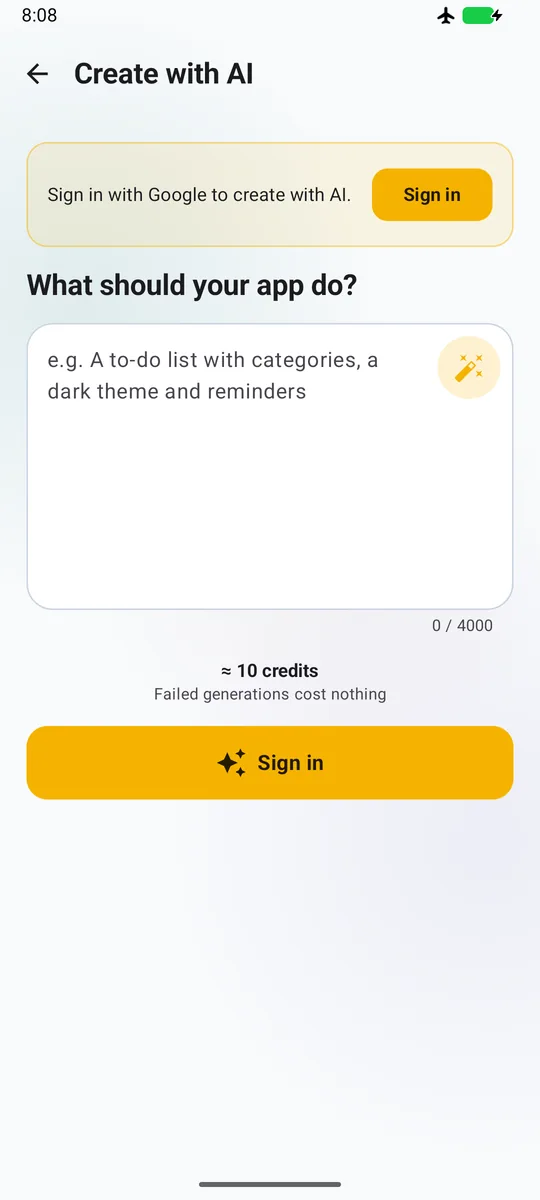
AI uses internet access, Google sign-in and credits. Review the sign-in consent, terms and privacy information in the app before continuing. Available credit packs and Pro benefits are shown in the current purchase screen; amounts and local prices can change.
Pro and credits are different: Pro unlocks product capabilities, while credits pay for AI usage. An estimate is not a fixed final charge. Actual consumption depends on the generation and is reported by the service. This guide does not promise a free trial or a fixed number of apps per purchase.
Create your first app
- Open Create Project → Create with AI.
- Sign in through the app’s consent flow if needed.
- Check your balance and any displayed estimate.
- Describe the users, screens, data and behaviour you need.
- Start generation, watch the response and review the result.
- Preview the HTML and test its important interactions.
- Continue as an ordinary local app project and build the APK.
Example request: “Create an offline habit tracker with three daily habits, a reset button and local storage. Use embedded CSS and JavaScript. Do not use external services.”
The offline requirement is explicit here; AI output is not automatically free of remote dependencies.
AI-created projects include native API access for the generated app. AAB export and other Pro-only customization still follow their own access rules.
Edit through a conversation
Ask for a specific change, such as “Keep the current layout; add a confirmation before Reset.” Inspect the result and preview again. Keep a copy of working HTML before large changes. A generated interface can look convincing while calculations, permissions or persistence are still wrong.
Background completion and stopping
Leaving the generation screen can offer cancellation or background completion. A background turn may continue and use credits. Use the app’s Stop action to request cancellation; closing the screen or losing the connection is not the same action. Follow the status/history in the app instead of repeatedly starting duplicate requests.
Test and protect your data
Review links, scripts, requested permissions and data storage before sharing. Do not send secrets, signing keys or private customer data in prompts. AI can make mistakes; test the installed app as well as the preview.
If sign-in or generation is unavailable, check connectivity, the displayed account status and the service error. Local HTML creation remains a separate workflow. Get the builder or start with your own code.