
HTML to APK Builder includes a full HTML code editor as well as the quick paste box. Use the editor to create or change a document, preview it, then turn it into an app when you are ready.
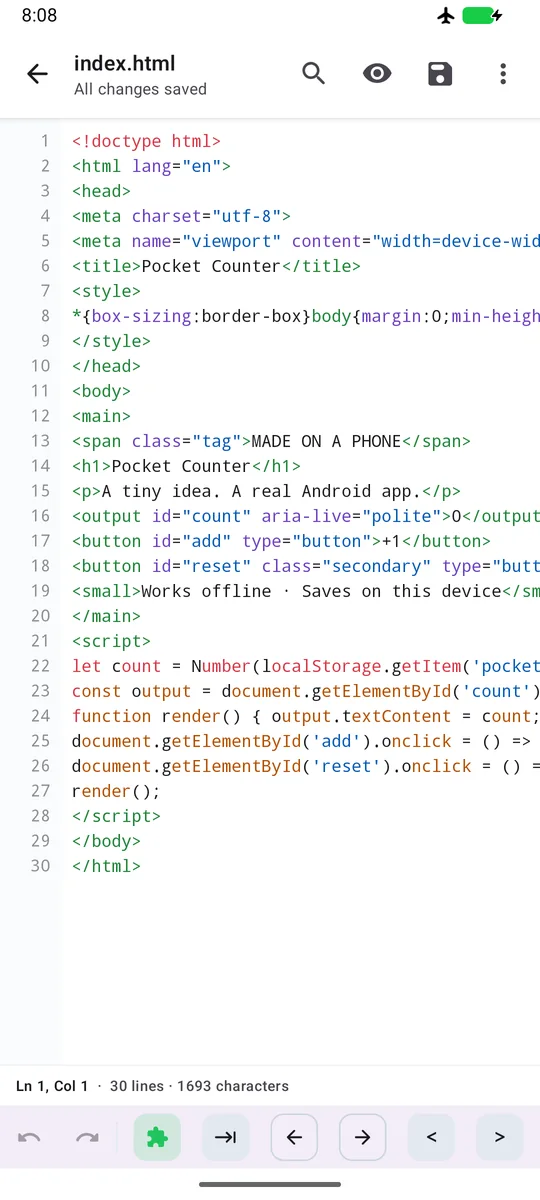
Open the code editor
- Tap Create Project on Projects.
- Expand Open / edit HTML.
- Choose Open file for an existing HTML document or Blank page for a new one.
- Enter or paste your HTML. Use the editor’s save action to preserve the document.
Document editing and app creation are distinct: opening an HTML document does not immediately create an APK. Use the document’s convert/create-app action when you want an app project. You can also use Edit HTML from an existing app project’s content settings.
Editing tools
The editor offers syntax colours, undo/redo, search and replacement. Smart typing can help with indentation and closing tags when enabled. Keep the complete HTML structure and escape special characters where needed.
For multi-file projects, import the complete folder in Advanced Build. Opening one HTML file does not copy every neighbouring resource from your file manager automatically.
Preview and return
Open Preview to check the layout and JavaScript, then return to the editor. Your editing session survives switching to preview, but saving and backing up the source are still good habits. Native AndroidAPI features belong to the installed generated app; an HTML document preview is not an Android permission test.
Try changing the heading in the Pocket Counter example, preview it and press +1. It should update the displayed value. If nothing happens, check the script and element IDs.
Saving and common mistakes
When editing an external file, retain write access to the selected location. Read-only providers, revoked access, unavailable storage and oversized documents can stop loading or saving. Read the error instead of assuming an empty view means the file is empty.
Keep a separate copy before major edits. A saved file and a built APK are separate artifacts: rebuild after changing the source to update the APK.
The free plan supports up to five HTML document projects, separately from app and PDF limits. Pro removes the saved-project limit. Follow the APK tutorial when the page is ready, or download the builder.