
HTML to APK Builder signs the APK it creates on your phone. For future updates, you must preserve the app’s package identity and the corresponding signing key. A new build with a different key is not a compatible update just because the app name is the same.
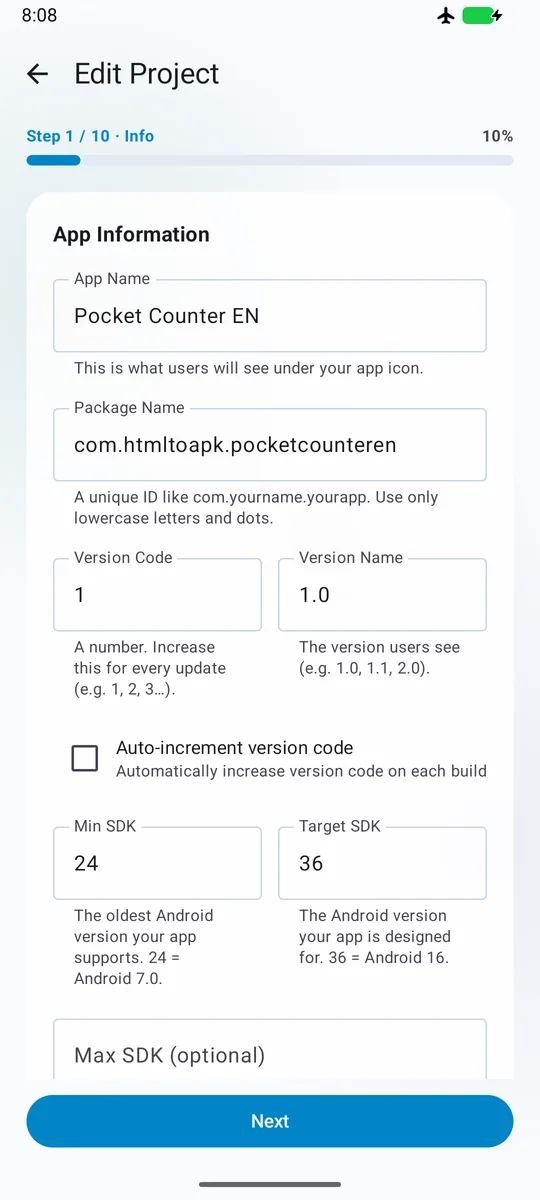
Understand the identifiers
- App name is the label a person sees.
- Package name identifies the Android app, for example
com.yourname.counter. - Version name is a readable label such as
1.1. - Version code is a number used to order releases.
- Signing key establishes who can sign compatible updates.
Changing the display name does not change the package identity. Raising the version name alone does not replace raising the version code.
Manage keys in the builder
Open Keystore Manager from Profile → Settings, or with Manage Keystore in the Output step of Advanced Build.
| Action | Free | Pro |
|---|---|---|
| Default (auto-generated) key for builds | yes | yes |
| Create Keystore with your own alias, password and validity | one key | unlimited |
| Link a key to a project and build with it | yes | yes |
| View SHA-1 / SHA-256 certificate fingerprints and Copy fingerprint | yes | yes |
Keep a copy on this device (saved to Downloads/HTMLtoAPK/Keystores) |
yes | |
Import Keystore (.jks, .p12) with alias and password |
yes | |
| Export .p12 (full key backup) and Export .pem (certificate only) | yes | |
| Export for Play Store (PEPK) | yes | |
| Find backups on device | yes |
Fingerprints are needed when a service asks for your app’s signing certificate, for example Firebase, Google Sign-In or Facebook Login. Copy the SHA-1 or SHA-256 from the key you build with.
Export for Play Store (PEPK) creates the output.zip Google Play asks for when you upload your own app signing key. Paste the hex key from Play Console or pick its encryption public key (.pem), then Generate output.zip.
Deleting a key removes the file, its saved passwords and its copy in Downloads. Apps already signed with it can then only be updated from a backup. Projects linked to a deleted key fall back to the default key.
Keep the key file and its passwords in a secure backup you can recover, outside the phone. Never put a .jks, keystore password or signing configuration in public HTML, screenshots, a website repository or a support message.
Google Play and upload keys
With Play App Signing (the default for new apps), you sign the AAB with your upload key and Google signs the app delivered to users with the app signing key it protects. If you lose the upload key, the Play Console can reset it:
- Create a new keystore in Keystore Manager and use Export .pem to get its certificate.
- In Play Console, open your app’s App signing page and request an upload key reset with that certificate.
- After Google confirms, build with the new key.
Without Play App Signing, a lost key means the app can no longer be updated; you would have to publish under a new package name.
Update an app
- Edit the original project or restore its source.
- Keep the same package name.
- Use the same signing key, or the store’s correct upload-key arrangement.
- Increase the version code.
- Build and install over the previous version on a test device.
- Check that saved user data and app behaviour remain correct.
For Google Play, check the app’s Play App Signing configuration rather than assuming the locally generated key is the store’s final app-signing key.
Missing key or installation conflict
The builder can fall back to its default key when a selected custom key is unavailable. This helps produce a file, but does not preserve compatibility with an app previously signed by the missing key. Verify the key before releasing an update.
If Android rejects a conflicting installation, compare package identity and signing certificates. Recover the original key or use an intentional new package for a distinct app. Uninstalling can erase data and does not recover a lost signing key.
Keep a release record
Save source, package name, version code, APK/AAB, signing-key identifier and test results together. Keep the secret key separately. This small habit makes phone-only app maintenance much more predictable.