
Use Advanced Build when you need control beyond Quick Build. The wizard separates app information, content, display, permissions, icon, splash, WebView, ads and output. Options marked Pro require the corresponding access; a visible setting is not always available on the free plan.
Appearance and icons
On Display, review orientation, system bars, fullscreen, keeping the screen awake and related presentation options. Immersive/fullscreen choices affect system bars; they do not turn the app into a managed-device kiosk or prevent Android from leaving the app.
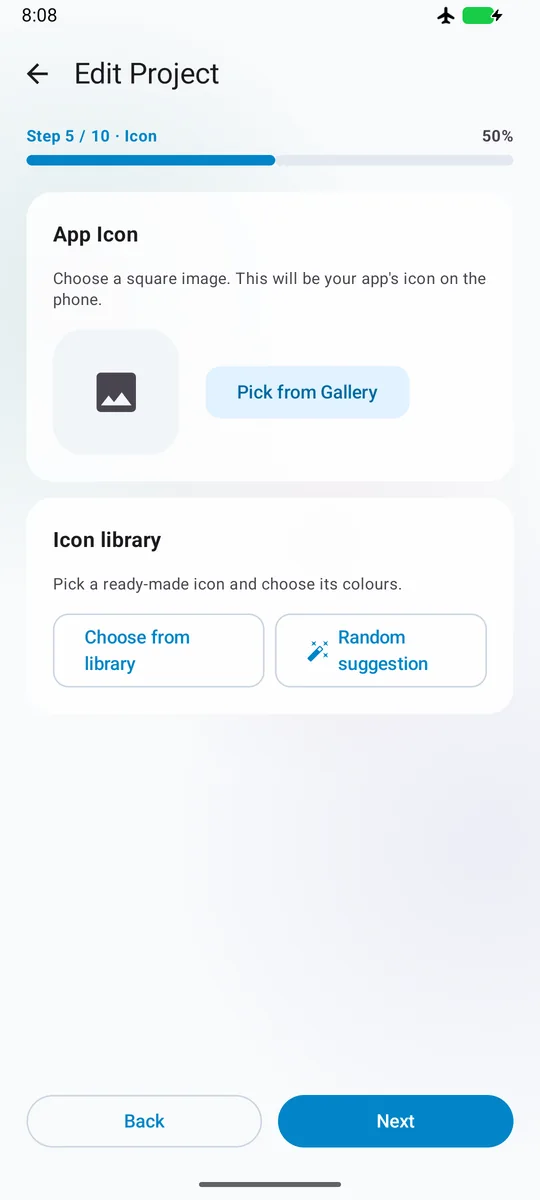
On Icon, choose a gallery image, crop it, or use the icon library. The icon library belongs to Advanced Build. Where available, the background option supports automatic colour, a custom colour or transparency. Android launchers may supply their own background treatment for transparent icons.
Splash customization is Pro-gated. Keep images readable on different screen proportions. Previewing a page does not fully simulate launcher icons or the app’s launch sequence; install the APK to check them.
WebView behaviour
The WebView step includes JavaScript and storage behaviour, caching, zoom, user-agent and other advanced controls. Some controls require Pro. Start from defaults and change one thing at a time.
Turning JavaScript off breaks interactive HTML. Remote HTTP resources within HTTPS content can be affected by mixed-content settings and browser restrictions. A relaxed setting cannot repair every network or server problem.
Back navigation, popups, file upload and downloads are important parts of a website wrapper. Test the actual site, login provider and download flow after installation. Keep native API access restricted to your own trusted content.
Permissions
Add only permissions used by your feature. Manifest declaration and runtime consent are separate. Camera/microphone web APIs, geolocation and notifications need their appropriate setup. The Android API guide distinguishes standard browser APIs from native bridge calls.
AdMob
The Ads step supports AdMob app/unit settings and banner, interstitial and rewarded formats. Supply valid IDs for your own AdMob configuration and use test mode while developing.
The generated ads-enabled app includes a consent flow. Configure privacy-related choices responsibly and test consent, rejection and privacy settings alongside ad behaviour. Ad availability depends on consent, network and SDK readiness; a successful APK build does not guarantee an ad will load or earn revenue.
Ad integration in an app you create is separate from whether the builder itself displays promotions or a watermark. Free generated builds include branding; Pro can remove it. Read the AAB guide before store submission, or get the builder.